
Purpose
This policy and the associated procedures are designed to clarify and provide guidance on Dr Logic’s health and safety policies.
Scope
This policy covers all Dr Logic employees.
Summary
A summary of areas covered by this policy is detailed below:
- Introduction
- Accidents, First Aid and Work-Related Ill-Health
- Emergency Procedures
- Workplace Provisions
- Display Screen Equipment
Dr Logic will regularly review this policy to reflect changes in legislation and good practice.
Responsibilities
The directors of Dr Logic hold overall responsibility for health and safety, including ensuring this policy is implemented daily. They will maintain or improve safety standards with the support of all employees.
In greater detail, the directors’ health and safety responsibilities are to ensure that:
- The policy is effectively implemented, monitored, and updated as needed to reflect legislative changes or Dr Logic’s development
- They engage employees in improving health and safety
- Adequate resources are provided to meet policy requirements
- Appropriate insurance cover is maintained
- All employees understand and comply with policy requirements
- Employees receive appropriate training for their tasks and equipment, and relevant information is shared with them
- Disciplinary procedures are in place for non-compliance with the policy
- Liaison with external safety and health organisations is established where appropriate
- Work equipment is in good condition, maintained, suitable, and certified where needed
- Hazardous substances are stored and handled according to established procedures
All employees must:
- Understand this policy and their responsibilities
- Cooperate with Dr Logic to comply with health and safety laws
- Avoid intentionally misusing or interfering with safety equipment
- Follow all safety instructions
- Report all accidents, incidents, or damage to a director via HR, whether injuries occur or not
- Suggest health and safety improvements to a director via HR
- Use the correct and properly maintained equipment
- Report defects in equipment or safety hazards
- Avoid actions or inactions that could endanger themselves or others
- Refrain from improvisation
- Respect welfare facilities provided for their health and safety eg: toilets, kitchen areas
- Set a positive example for others
- Inform their manager of any health changes either temporary or permanent, which do, or might affect their working ability or their suitability to carry out any particular task(s)
- Understand that disciplinary action may follow any breach of health and safety legislation or this policy
Risks Arising from Our Work Activities
Risk assessments will be conducted by HR with support from the directors as needed. The findings will be communicated to employees as appropriate. Any actions required to eliminate or control risks will be approved by the directors in consultation with employees. The directors will ensure these actions are implemented, and our external health and safety advisor will reassess them to confirm that risks have been removed or reduced.
Assessments will be reviewed annually or sooner if work activities change.
Information, Instruction, and Supervision
Dr Logic will ensure all employees are aware of any health and safety issues raised by either our health and safety advisor or the directors. Consultation with employees may be provided in a variety of ways including directly with employees or through display or issue of appropriate communication.
Due to the various locations in which employees work, we do not have a displayed health and safety law poster, however all employees are provided with a copy of the health and safety law leaflet. Health and safety advice is available from HR in the first instance or from our health & safety advisor (contact details available from HR).
Employees at Special Risk
Dr Logic recognises that some employees may from time to time be at increased risk of injury or ill-health resulting from work activities. We, therefore, require that all employees advise us if they become aware of any change in their personal circumstances which could result in them being at increased risk. This could include medical conditions, permanent or temporary disability, taking medication and pregnancy.
Competency for Tasks and Training
Safety training is a key part of our health and safety program. All employees will be trained in safe working practices, including equipment use. Induction training and job-specific training will be provided as needed. Special training for roles like first aiders and fire wardens will be arranged by qualified providers.
Training records are kept in HR files, and the company will monitor training needs. Any identified training will be arranged after HR approval.
Safe Equipment
The directors are responsible for identifying maintenance needs, ensuring maintenance procedures are created, and that required maintenance is completed. Portable appliance testing will be conducted in line with current guidance to ensure equipment safety.
Employees should immediately report to their manager any workplace or equipment issues who in turn should inform HR. The directors, with the health and safety advisor, will ensure new equipment meets health and safety standards before use or purchase.
Safe Handling and Use of Substances
The health and safety advisor is responsible for identifying substances requiring a COSHH assessment, conducting the assessments, and informing relevant employees. Directors will ensure the implementation of actions from assessments conducted.
Both directors and the health and safety advisor will check the safe use and storage of new substances before use or purchase and ensure relevant data sheets are available.
Assessments will be reviewed annually or when work activities change, whichever comes first.
Drugs and Alcohol
Dr Logic recognises the impact that drugs and alcohol may have on an employee’s ability to work safely and correctly. If any employee is concerned that they, or any of their colleagues are misusing drugs, or medication and/or are excessively consuming alcohol, they are encouraged to speak to their manager as soon as possible.
If any employee is prescribed medication by their doctor, they must immediately discuss this with their manager and provide confirmation from their doctor as to any possible side effects if: such medication may affect their ability to carry out their duties and/or drive; and/or such medication is covered by the Misuse of Drugs Act 1971. This will apply whether or not there is any actual threat to health and safety.
Alcohol consumption during work hours is inappropriate, except for genuine client or customer entertainment. It is also inappropriate before work or during breaks if it may affect performance.
The use of controlled drugs, solvents, legal highs, or psychoactive substances is prohibited during work hours, breaks, or before work if it impacts performance. Misusing medication that affects work is also prohibited. Any illegal drug activity at work will be reported to the police.
For the avoidance of doubt, using prescribed controlled drugs is allowed, but failure to comply with notification and risk assessment requirements may lead to disciplinary action being brought against an employee.
Manual Handling
The Manual Handling Operations Regulations 1992 (amended 2002) govern manual handling and outline the requirements for avoiding and assessing tasks. Dr Logic aims to minimise risks associated with manual handling by implementing risk control measures.
The priority is to eliminate manual handling where possible. If not feasible, steps will be taken to reduce manual handling, aiming to keep item weights below 25 kg. If that isn’t achievable, appropriate lifting aids will be acquired, and employees will receive proper training.
Employees will be trained in correct manual handling techniques during induction where applicable. Additional information on manual handling can also be found in the Company’s manual handling guide.
Employees must ensure that:
- They report to their manager (in confidence) any personal conditions, which may be detrimentally affected by the manual handling activity
- They comply with any instruction and training provided in safe manual handling activities
- Their own health and safety is not put at risk when carrying out manual handling activities
- They use equipment, which has been provided to minimise manual handling activities
- Any problems relating to the activity are reported to their manager immediately
Safe Driving
Managing risks, including those related to work-related driving, are met in line with legal obligations under the Health and Safety at Work Act 1974, the Management of Health and Safety at Work Regulations 1999, and the Provision and Use of Work Equipment Regulations 1998.
Employees driving on business must:
- Follow road traffic laws, prioritise road safety, and use defensive driving techniques
- Hold a valid license and report any suspensions or limitations
- Avoid carrying unauthorised passengers
- Undergo regular eye tests and wear corrective lenses if required
- Regularly check vehicle oil, water, brake fluid, and tyre pressure
- Report all accidents or near misses to HR
- Ensure personal vehicle insurance covers business use
Dr Logic will not require employees to drive under unsafe conditions. When using personal vehicles, employees must provide evidence of vehicle servicing, conduct regular checks, and have adequate insurance for business use, with proof provided upon request.
Note that though hands-free phone kits are legal, they can still distract. Employees must not use any type of phone, make calls, text, or browse while driving. Always pull over safely and turn off the engine before making or answering calls.
If involved in an accident employees should:
- Immediately stop their vehicle at the scene or as close to it as possible, making sure they are not obstructing traffic and ensuring their own safety. Help any injured people and call for assistance if needed
- Contact the police if there are injuries or damage to third-party property
- Try and obtain full contact and insurance details for any other vehicle involved and the and the contact details of any witnesses. If an unattended vehicle is damaged, a note on the vehicle should be left with contact details
- Inform HR of the accident at the earliest opportunity
Accidents, First Aid, and Work-Related Ill-Health
Introduction
All accidents, regardless of location that take place while on Dr Logic business and cases of work-related ill health are to be recorded in the accident book. The forms from this book are then kept in line with legislative requirements.
Employees should report all accidents immediately directly to their manager, giving detailed information about the incident.
The responsibility for reporting accidents, diseases, and dangerous occurrences to the enforcing authority lies with the directors and/or our health and safety advisor.
Dr Logic’s policy is to have at least one first aid trained member of staff where employees are office based.
In addition to the above:
- Employees who work from home should:
- Ensure they have an adequately stocked first aid kit accessible to them
- Be aware of the nearest defibrillator
- Ensure their home working environment is safe and comfortable and fulfils all health & safety requirements including maintaining any areas in which they work
- Employees visiting client sites should:
- Familiarise themselves with clients’ first aid protocols upon their arrival at the premises
- Promptly raise any health and safety concerns about a client site with their manager and should not feel obligated to stay in the building until the issues are resolved
- Employees based at Convex should:
- Familiarise themselves with Convex’s (52 Lime Street, London, EC3M 7AF, UK) first aid protocols during the induction process
- Be aware there are first aid boxes located on each floor in the stationery cupboards, as well as in the well-being room. There are green stickers located on the front of the stationery cabinets showing where they are located
- Be aware that the nearest defibrillator is located at the following location:
122 Leadenhall Street, London, EC3V 4AB

To ensure safe working conditions and practices, Dr Logic will actively monitor emergency and disaster plans and document any findings. We will also monitor and report near-misses, accidents, and instances of ill health, investigating any incidents thoroughly.
One of the directors, with assistance from our health and safety advisor, will be responsible for investigating accidents and the work-related causes of sickness absences. The directors and health and safety advisor will act on the findings from these investigations to prevent future occurrences.
For additional first aid information please refer to the Company’s first aid guide.
Stress at Work
As a responsible employer, Dr Logic is aware of the duty of care regarding the mental health and welfare of all employees. For this reason, we will take all reasonable steps to ensure that employees are not placed under excessive stress by their work.
The Health & Safety Executive defines stress as the reaction to excessive pressures or demands that exceed a person’s ability to cope. Prolonged stress can lead to physical and psychological health deterioration, making early recognition crucial.
As stress is also caused by bullying, harassment and violence, we are required by law to provide a working environment that is, as is reasonably practicable, free from these influences. However, we are legally entitled to assume that all employees can cope with the normal day-to-day pressures of their job. If this is not the case, employees have a duty to inform us.
Should any employee feel that they are suffering from an unacceptable level of work-related stress, they should inform their manager, who will treat the matter with empathy and in confidence. Should an employee not feel comfortable discussing the matter with their manager, then please speak to HR, or an appointment can be made to speak to our external health and safety advisor in confidence.
If necessary, Dr Logic will carry out a stress risk assessment. This will include a review of the employee’s actual duties against those described in their job description. The findings of the risk assessment will be discussed with the employee and if appropriate, changes will be made to their role in order to reduce the levels of stress experienced. Alternatively the employee will be referred to a doctor of the company’s choice for a medical assessment.
Whilst Dr Logic is not responsible for causes of stress outside the working environment, we recognise that stress caused by non-work related issues can impact an employee’s attendance and work performance. Therefore, we would strongly encourage employees to make their manager aware of any problems which are causing them concern.
Emergency Procedures – Fire and Evacuation
The directors are responsible for ensuring that fire risk assessments are undertaken and implemented for our business premises. At the time of writing the company is not based at any premises.
Employees who work from home should:
- Maintain their exit routes from their work area ensuring there are no obstructions
- Have working smoke alarms and working fire extinguishers
Employees who work from client sites should:
- Familiarise themselves with clients’ emergency procedures upon arrival at the premises
- Notify their manager at the earliest possible opportunity should such an emergency procedure be implemented
Employees who work at Convex should:
- Familiarise themselves with Convex’s emergency procedures during the induction process
- Follow the instructions of the fire marshals who will assist in ensuring the building is evacuated in a timely and safe manner
- Report to your manager that you have safely evacuated the building
Generally speaking, the following emergency procedure will apply for any building:
- The automatic fire detection system should activate the fire alarm, if the alarm does not sound, activate the fire alarm by using the nearest fire alarm call point
- Leave the building by the nearest available exit/route ensuring those around you also evacuate. Escort any visitors, assist any disabled people who require assistance (closing all doors and windows behind you) and make your way to the assembly point. Remember to check the temperature of the surface of any closed doors before opening them.
- Don’t take risks, don’t collect personal belongings, don’t re-enter the building for any reason unless authorised to do so and don’t block any exits
- Remain calm at all times, don’t run, push or shove colleagues
- Everyone should walk in a brisk manner and make their way to the designated safe assembly point
- Homeworkers should evacuate to the front of their property, or to the designated assembly point in the case of a block of flats/apartments
- Ensure the fire service has been called – 999
- Notify any fire marshalls that you are safely out of the building and what you’ve seen e.g. smouldering waste paper. Also notify them if any colleague is missing
- Stay at the assembly point until the all-clear has been given by the fire brigade or fire marshall to go back into the building.
For additional fire safety information please refer to the Company’s fire and electrical safety guide.
Workplace Provisions
Introduction
Dr Logic’s legal duties concerning the provision of a safe place of work are covered by the Workplace (Health, Safety and Welfare) Regulations 1992. Should Dr Logic become office based again, to ensure employees have a safe place to work, we shall:
- Ensure that access to and egress from the workplace is maintained in a safe condition, where this is affected by weather conditions we shall take appropriate steps
- Provide sufficient toilet facilities for the use of male and female employees with washing facilities and appropriate sanitary disposal units
- Ensure that buildings are maintained in good condition, both internally and externally and there is adequate lighting for the tasks being undertaken
- Ensure that the workplace temperature is maintained at a minimum temperature of 16°C, or 13°C where manual tasks are undertaken, and that provision is made to keep the temperature to a reasonable level, where reasonably practicable
- Provide clean drinking water and appropriate facilities for employees to make hot drinks and heat food
- Ensure that work areas are cleaned regularly and provide suitable disposal units for waste and rubbish
- Ensure that all corridors, stairways and doors are maintained in a safe condition
Employees must ensure that they:
- Use the facilities provided for their intended use
- Keep their work area in a clean and tidy condition
- Report any problems to their manager immediately
Should there be a requirement for any part of Dr Logic’s premises to be repaired this will be arranged by HR through liaising with the controller of the premises. There may be a short time
between reports being made and the repair being made but we shall ensure that this time is kept to a minimum.
Dr Logic expects all clients to have high standards of workplace provision. Therefore if any employees working at, or visiting a client site have any concerns they should speak to their manager who will escalate the issue as necessary.
Smoking
It is illegal to smoke in enclosed or substantially enclosed workplaces and in order to portray a professional image to our clients and visitors, Dr Logic has a policy that prohibits employees from smoking, except in the designated outside areas where work may be undertaken. This will also apply to E-Cigarettes/Vapes. Smoking can be undertaken outside private dwellings where employees are homeworkers.
Lone Worker
When an employee is a lone worker, that can pose additional risks and therefore these need to be assessed and controls implemented to reduce them. When an employee is required to work alone Dr Logic shall ensure that:
- A specific risk assessment is made in respect of lone working, including any interaction an employee may have with the general public. The risk assessment will be specific to the working environment and the persons likely to be present
- There are methods of communication with the lone worker should an emergency arise
- Appropriate and periodic health screening is provided where necessary to ensure an employee’s fitness to undertake lone working
- All concerns raised by lone working employees are considered seriously and appropriate action taken so far as is reasonably practicable
- All employees who work alone are consulted and communicated with on a regular basis
All employees who work alone must ensure that:
- They report any concerns that arise out of working on their own to their manager
- They follow any training provided
- They carry the appropriate equipment to use in emergency situations at all times
- They attend health screening appointments where necessary and declare all medical conditions so as to ensure fitness can be assessed effectively and any further provisions can be implemented as required.
Homeworking
Homeworking is covered by the Health and Safety at Work Act 1974, which requires Dr Logic to manage homeworkers’ safety and welfare the same as on-site employees. To achieve this, a homeworking questionnaire – assessing key factors including ergonomic set up, working space and safety – will be issued to identify any potential health and safety issues. If deficiencies are found, we will take reasonable steps to address them. If unresolved, we may deny any request for homeworking based on health and safety concerns.
If approved, homeworking employees must ensure they have a dedicated suitable work environment, take care of provided equipment and maintain agreed health and safety standards, including fire safety.
A homeworker can not have any dependent care responsibilities during work hours.
Display Screen Equipment
Working with Display Screen Equipment (DSE) like computers, monitors, and other devices can affect the physical health of employees if not set up properly.
All employees will complete a self-assessed Display Screen Equipment (DSE) questionnaire when starting employment to determine if they are classified as “users” under legal guidelines. If issues arise, further assessment by the health and safety advisor may follow.
According to the Health and Safety (Display Screen Equipment) Regulations 1992, a “user” is anyone who works at a computer for an hour or more daily, with specific standards for seating and lighting.
Work Stations
Employees who are DSE users are reminded to adjust their workstations to minimise risks such as eye strain, fatigue, and upper limb discomfort. Specifically, workstations should be set up as follows to ensure comfort:
- Chair: The height and backrest should be adjusted to provide proper lumbar support. Feet should rest flat on the floor or on a footrest if necessary. Legs should remain
uncrossed, and any obstacles on the floor should be removed. Sitting on the edge of the chair should be avoided
- Screen/Monitor: Adjust the height, tilt, brightness, and contrast of the screen for comfort. Ensure the screen is clean and free from glare or reflections
- Keyboard and Mouse: The keyboard should be non-reflective and provide adequate space for resting the wrists. The mouse should be positioned close enough to prevent stretching, and the arms should remain relaxed
- Environment: Lighting should be adequate, with a comfortable temperature, and there should be no glare on the screen
- Document Holder (if used): Should be at the same height and distance as the screen
By making small adjustments to equipment such as chairs and monitors and maintaining a good posture – important to prevent stress on the body and mind and prevent tiredness – employees can work comfortably and safely for longer periods.
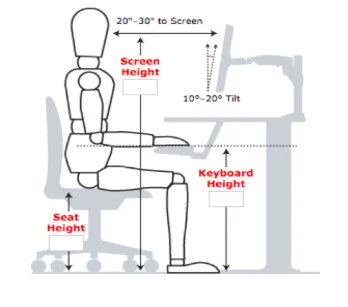
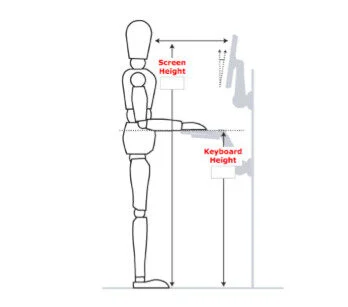
Any employees using standing desks should set these up in the same manner as a seated desk with eye level at the top of the screen and arms at a 90° angle. Its important to not lean into the desk and keep weight evenly distributed on the legs when standing, maintaining ‘soft’ knees and not locking the knees out when standing.
Employees are strongly encouraged to take regular breaks from the screen each hour, spending time on other work tasks. If any employee feels that their workload does not permit adequate breaks, this should be brought to the attention of their manager.
In order to comply with the DSE regulations, employees are also reminded to:
- Complete the self-assessment DSE questionnaire within 4 weeks of starting work with Dr Logic
- Complete the self-assessment questionnaire if there is a change to workstations (eg a house move in the case of home working) or they become DSE users for the first time
- Contact their manager if they do not know how to use the equipment they have been provided or would like additional items eg: footrest, phone headset to ensure their comfort
- Alert their manager immediately if they are experiencing any discomfort
- Follow any training and information in order to help them set up their workstation correctly
Eye Tests
Any employee who has been designated as a DSE user has the right to request an eye test. It is the employee’s responsibility to make arrangements to have the eye test carried out at an optician of their choice. Following the initial eye test, the frequency of any follow-up tests will be decided solely by the optician. Dr Logic will cover the cost of a basic eye test only.
If the optician confirms in writing that glasses are needed solely for DSE use, Dr Logic will contribute up to £80 of the cost. This figure is reviewed periodically and has been set to reflect the cost of a basic pair of glasses. Should employees wish to purchase a more expensive pair, then this amount will be made available towards the cost and the balance funded by the employee.
Laptops
Due to the smaller size and design of laptops, improper use can cause discomfort, particularly in the neck and shoulders. To prevent this:
- Laptops should only be used outside the office for short periods if no desktop or docking station is available
- If used as the main computer, a docking station, separate keyboard, mouse, and screen must be provided and used
- Employees should:
- avoid using laptops in stationary cars to prevent spinal strain
- Not overload laptop bags; distribute weight evenly
- Position laptops on a firm, properly heighted surface
- Angle the screen to reduce glare
- Ensure space for wrists and forearms while working
- Take at least a 10-minute break every hour
- Report any discomfort to their manager immediately
Tablet PC’s
Tablet PCs offer convenience but can cause discomfort if used improperly, particularly due to their smaller screens and keyboards. To avoid neck and shoulder strain, employees should follow these guidelines when using a tablet under 15 inches:
- Avoid prolonged use to prevent poor posture, headaches, and eye strain
- Position the screen directly in front of them
- Sit properly to avoid arm or back strain
- Not slouch or lean forward over the tablet
- Ensure screen glare is minimised for better clarity
- Use light pressure when writing with a pen on the tablet
- Never use a tablet while driving
- Take a 10-minute break every hour
- Report any discomfort to their manager immediately